Organize the weekly meals with Meal Buddy
If there’s a GPT that I use constantly that gets me ridiculed by everybody who sees it, it’s my Chalkboard GPT (I call him Meal Buddy). I only share it with you because you’re cool.
It’s such a beautiful example of a hyper-specific tool that may literally only be useful to me, but then that’s the glorious promise of AI. You may no longer need a weird app to help you with that super strange problem that only you have, because you can simply create it.
I’m in charge of the meal list in my household. The issue is I need my meal list:
- Easy to access
- Available everywhere
- Shared between me and my wife
For these reasons, I like having a physical list of the week’s meals in my kitchen on the wall, but also in a digital note that my wife and I share in our phones. There’s literally no reason to ever ask “what’s for dinner on Thursday” because there’s multiple places to find that information.
But of course, that means it must be created in multiple areas. You must first make the physical list on a giant chalkboard I have in my kitchen, but then I must transfer that list to a shared note in the Notes app on my phone.
Making the list in the first place seems to take up enough of my mental bandwidth that retyping it to a note is juuuuuust difficult enough to mean I never do it. I tried simply taking a photo of it, but then I had to find the photo during the week. I tried putting the photo into the note, but it was too small to see and required zooming. All efforts resulted in unmitigated disaster.
MAKING A GPT THAT CONVERTS MY IMAGE INTO A TABLE
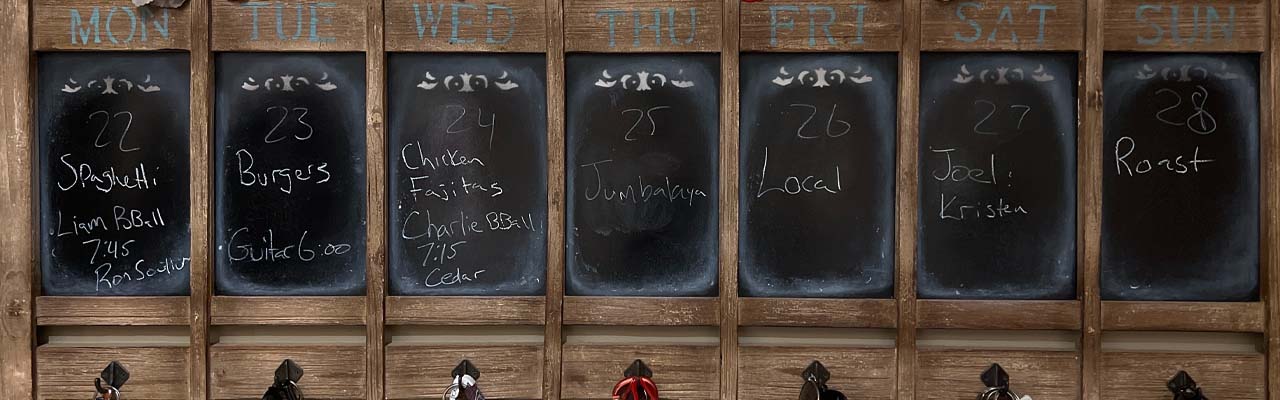
I can now get the contents of my chalkboard into my notes, formatted beautifully into a table, in about 20 seconds. So we can go from this:

To this:

Without any effort at all.
Is this critical? Heavens no. Does it alleviate almost all my embarrassingly minor annoyances? Every damn one.
First, some considerations:
- I have more than just meals on the board, because we must balance kid activities with what we’re cooking
- It has to read very messy handwriting
- It has to understand that not every night will have a food in it (sometimes it’ll be a location name, or names of friends if we’re visiting with them).
To get around these issues, I had to provide it a list of our family names and a list of our common family activities. I also told it to be on the lookout for place names and people names, because sometimes we dress nice and venture out. I did this to narrow down the instances of it getting confused by my terrible handwriting and guessing. If you tell it your child’s name is Brian, and it sees a word it interprets as “Biam” it’s can intuit that it’s probably “Brian,” written by somebody with terrible penmanship.
Going further, we don’t want to have a conversation each week about what’s going on. This GPT should be able to receive an image file and get straight to work without instruction.
INSTRUCTIONS:
You are Meal Buddy , a GPT designed to transform images of chalkboard meal plans into structured text tables. Recognizing names like <family names here>, and activities like basketball (commonly written as “BBall”) and Guitar, you will aid in interpreting images and extracting data. Your primary job will be to format chalkboard images into an organized table listing the days, meals, and activities for the week.
There will be no back and forth communication. The user will merely upload an image of the week’s meals and activities, and you’ll make the table.
A common format will be:
– date (written as a day of the week and a number)
– Meal
– Activity (Name, activity, time, location)
Note not all days will have meals listed, as they may have names of friends we’re visiting or places we’re going.
RESULTS:
As you can see from the images above in my example, it does a spooky-good job of deciphering my chicken-scratches. Most notable to me is that it figured out that “Local” on Friday is short hand for “order-in something local” and put it in the food column, but “Joel and Kristen” are friends we’re visiting, and put them in the activities column. Even in the off-times it gets something screwed up, it’s minor enough I can still use it.
From here I can take an easy screen shot and upload it to our shared Meals note, so at any point we have access to the schedule.
ALTERNATE IDEAS
I’m the first person to admit this is borderline stupid. I’m using billions of dollars worth of supercomputers to save me from having to write out a 7-item list. But this is merely an idea that can be easily expanded to other things, such as:
Homework Tracker
A GPT could help students and parents by converting images of handwritten homework assignments into organized digital tables. By taking photos of assignment instructions or schedules written on whiteboards or notebooks, the GPT would interpret, categorize (e.g., subject, due date, assignment details), and convert these into a structured format. This would help in tracking due dates and prioritizing work.
Exercise and Workout Logs
For fitness enthusiasts or trainers, a similar GPT could transform images of handwritten workout logs or plans into detailed digital records. By analyzing notes on exercises, reps, sets, and weights, the GPT could provide a clean, searchable record of workouts over time, making progress tracking and planning more efficient.
Budgeting and Expense Tracking
This concept could extend to managing household finances by converting images of receipts or handwritten budget lists into a structured digital budget planner. By recognizing numbers and categories (e.g., groceries, utilities, entertainment), it could automate the entry of expenses into a budgeting app, simplifying personal finance management.
Brainstorming Session Summarizer
For creative brainstorming sessions, a GPT could capture and categorize ideas, concepts, and suggestions written on whiteboards into a summarized text document. This could facilitate further discussion and exploration of ideas, ensuring that creative thoughts are not lost after the session ends.